ExoPlayer’s main demo app serves two primary purposes:
- To provide a relatively simple yet fully featured example of ExoPlayer usage. The demo app can be used as a convenient starting point from which to develop your own application.
- To make it easy to try ExoPlayer. The demo app can be used to test playback of your own content in addition to the included samples.
This page describes how to get, compile and run the demo app. It also describes how to use it to play your own media.
Getting the code
The source code for the main demo app can be found in the demos/main folder of
our GitHub project. If you haven’t already done so, clone the project into a
local directory:
git clone https://github.com/google/ExoPlayer.git
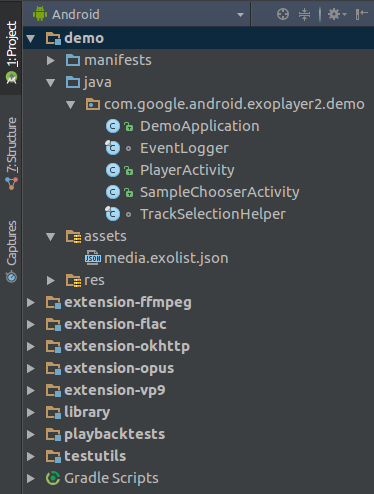
Next, open the project in Android Studio. You should see the following in the Android Project view (the relevant folders of the demo app have been expanded):
Compiling and running
To compile and run the demo app, select and run the demo configuration in
Android Studio. The demo app will install and run on a connected Android device.
We recommend using a physical device if possible. If you wish to use an emulator
instead, please read the emulators section of Supported devices and ensure
that your Virtual Device uses a system image with an API level of at least 23.
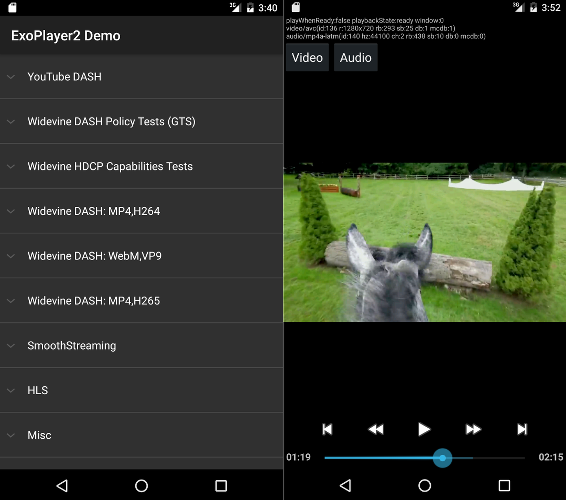
The demo app presents of a list of samples (SampleChooserActivity). Selecting
a sample will open a second activity (PlayerActivity) for playback. The demo
features playback controls and track selection functionality. It also uses
ExoPlayer’s EventLogger utility class to output useful debug information to
the system log. This logging can be viewed (along with error level logging for
other tags) with the command:
adb logcat EventLogger:V *:E
Enabling interactive media ads
ExoPlayer has an IMA extension that makes it easy to monetize your content
using the Interactive Media Ads SDK. To enable the extension in the demo
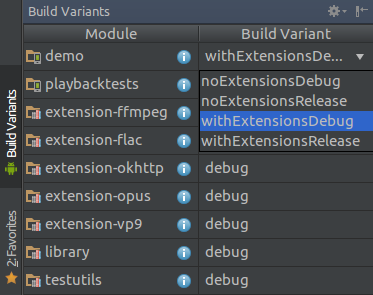
app, navigate to Android Studio’s Build Variants view, and set the build variant
for the demo module to withExtensionsDebug or withExtensionsRelease as shown
in Figure 3.
Once the IMA extension is enabled, you can find samples of monetized content under “IMA sample ad tags” in the demo app’s list of samples.
Enabling extension decoders
ExoPlayer has a number of extensions that allow use of bundled software decoders, including AV1, VP9, Opus, FLAC and FFmpeg (audio only). The demo app can be built to include and use these extensions as follows:
- Build each of the extensions that you want to include. Note that this is a
manual process. Refer to the
README.mdfile in each extension for instructions. - In Android Studio’s Build Variants view, set the build variant for the demo
module to
withExtensionsDebugorwithExtensionsReleaseas shown in Figure 3. - Compile, install and run the
democonfiguration as normal.
By default an extension decoder will be used only if a suitable platform decoder does not exist. It is possible to specify that extension decoders should be preferred, as described in the sections below.
Playing your own content
There are multiple ways to play your own content in the demo app.
1. Editing assets/media.exolist.json
The samples listed in the demo app are loaded from assets/media.exolist.json.
By editing this JSON file it’s possible to add and remove samples from the demo
app. The schema is as follows, where [O] indicates an optional attribute.
[
  {
    "name": "Name of heading",
    "samples": [
      {
        "name": "Name of sample",
        "uri": "The URI of the sample",
        "extension": "[O] Sample type hint. Values: mpd, ism, m3u8",
        "drm_scheme": "[O] Drm scheme if protected. Values: widevine, playready, clearkey",
        "drm_license_url": "[O] URL of the license server if protected",
        "drm_key_request_properties": "[O] Key request headers if protected",
        "drm_multi_session": "[O] Enables key rotation if protected",
        "ad_tag_uri": "[O] The URI of an ad tag, if using the IMA extension"
        "spherical_stereo_mode": "[O] Enables spherical view. Values: mono, top_bottom, left_right",
        "subtitle_uri": "[O] The URI of a subtitle sidecar file",
        "subtitle_mime_type": "[O] The MIME type of subtitle_uri (required if subtitle_uri is set)",
        "subtitle_language": "[O] The BCP47 language code of the subtitle file (ignored if subtitle_uri is not set)",
      },
      ...etc
    ]
  },
  ...etc
]
Playlists of samples can be specified using the schema:
[
  {
    "name": "Name of heading",
    "samples": [
      {
        "name": "Name of playlist sample",
        "playlist": [
          {
            "uri": "The URI of the first sample in the playlist",
            "extension": "[O] Sample type hint. Values: mpd, ism, m3u8"
            "drm_scheme": "[O] Drm scheme if protected. Values: widevine, playready, clearkey",
            "drm_license_url": "[O] URL of the license server if protected",
            "drm_key_request_properties": "[O] Key request headers if protected",
            "drm_multi_session": "[O] Enables key rotation if protected"
          },
          {
            "uri": "The URI of the first sample in the playlist",
            "extension": "[O] Sample type hint. Values: mpd, ism, m3u8"
            "drm_scheme": "[O] Drm scheme if protected. Values: widevine, playready, clearkey",
            "drm_license_url": "[O] URL of the license server if protected",
            "drm_key_request_properties": "[O] Key request headers if protected",
            "drm_multi_session": "[O] Enables key rotation if protected"
          },
          ...etc
        ]
      },
      ...etc
    ]
  },
  ...etc
]
If required, key request headers are specified as an object containing a string attribute for each header:
"drm_key_request_properties": {
  "name1": "value1",
  "name2": "value2",
  ...etc
}
In the sample chooser activity, the overflow menu contains options for specifying whether to prefer extension decoders, and which ABR algorithm should be used.
2. Loading an external exolist.json file
The demo app can load external JSON files using the schema above and named
according to the *.exolist.json convention. For example if you host such a
file at https://yourdomain.com/samples.exolist.json, you can open it in the
demo app using:
adb shell am start -d https://yourdomain.com/samples.exolist.json
Clicking a *.exolist.json link (e.g., in the browser or an email client) on a
device with the demo app installed will also open it in the demo app. Hence
hosting a *.exolist.json JSON file provides a simple way of distributing
content for others to try in the demo app.
3. Firing an intent
Intents can be used to bypass the list of samples and launch directly into
playback. To play a single sample set the intent’s action to
com.google.android.exoplayer.demo.action.VIEW and its data URI to that of the
sample to play. Such an intent can be fired from the terminal using:
adb shell am start -a com.google.android.exoplayer.demo.action.VIEW \
    -d https://yourdomain.com/sample.mp4
Supported optional extras for a single sample intent are:
- Sample configuration extras:
extension[String] Sample type hint. Valid values:mpd,ism,m3u8.prefer_extension_decoders[Boolean] Whether extension decoders are preferred to platform ones.drm_scheme[String] DRM scheme if protected. Valid values arewidevine,playreadyandclearkey. DRM scheme UUIDs are also accepted.drm_license_url[String] Url of the license server if protected.drm_key_request_properties[String array] Key request headers packed as name1, value1, name2, value2 etc. if protected.drm_multi_session: [Boolean] Enables key rotation if protected.ad_tag_uri[String] The URI of an ad tag, if using the IMA extension.spherical_stereo_mode[String] Enables spherical view. Values:mono,top_bottomandleft_right.subtitle_uri[String] The URI of a subtitle sidecar file.subtitle_mime_type: [String] The MIME type of subtitle_uri (required if subtitle_uri is set).subtitle_language: [String] The BCP47 language code of the subtitle file (ignored if subtitle_uri is not set).
- Player configuration extras:
abr_algorithm[String] ABR algorithm for adaptive playbacks. Valid values aredefaultandrandom.tunneling[Boolean] Whether to enable multimedia tunneling.
When using adb shell am start to fire an intent, an optional string extra can
be set with --es (e.g., --es extension mpd). An optional boolean extra can
be set with --ez (e.g., --ez prefer_extension_decoders TRUE). An optional
string array extra can be set with --esa (e.g.,
--esa drm_key_request_properties name1,value1).
To play a playlist of samples, set the intent’s action to
com.google.android.exoplayer.demo.action.VIEW_LIST. The sample configuration
extras remain the same as for com.google.android.exoplayer.demo.action.VIEW,
except for two differences:
- The extras’ keys should have an underscore and the 0-based index of the sample
as suffix. For example,
extension_0would hint the sample type for the first sample.drm_scheme_1would set the DRM scheme for the second sample. - The uri of the sample is passed as an extra with key
uri_<sample-index>.
Other extras, which are not sample dependant, do not change. For example, you can run the following command in the terminal to play a playlist with two items, overriding the extension of the second item:
adb shell am start -a com.google.android.exoplayer.demo.action.VIEW_LIST \
    --es uri_0 https://a.com/sample1.mp4 \
    --es uri_1 https://b.com/sample2.fake_mpd \
    --es extension_1 mpd